Self-Hosted Web Push Integration Guide
📁 Getting Started
🕐 Updated 1 month ago
 HyperPush X Docs
Welcome to HyperPush X! This step-by-step guide helps you quickly integrate instant web push notifications into your website or web application. In just a few minutes, you will be ready to send real-time push alerts to re-engage your visitors and boost sales.
HyperPush X works seamlessly across all major modern desktop and mobile web browsers with zero browser extensions required:
| Browser | Desktop Support | Mobile & Tablet Support | Status |
|---|---|---|---|
| Google Chrome | ✅ Supported | ✅ Supported (Android) | Ready |
| Mozilla Firefox | ✅ Supported | ✅ Supported (Android) | Ready |
| Apple Safari | ✅ Supported (macOS) | ✅ Supported (iOS 16.4+) | Ready |
| Microsoft Edge | ✅ Supported | ✅ Supported (Android) | Ready |
| Brave / Opera | ✅ Supported | ✅ Supported (Android) | Ready |
[!NOTE] Web Push requires an HTTPS secure connection on your website (e.g.
https://yourdomain.com).
First, register your website in your HyperPush X console:
/websites).https://acme.com).
Once added, your website receives a unique Site Key (site_key) that connects your website to your HyperPush X account.

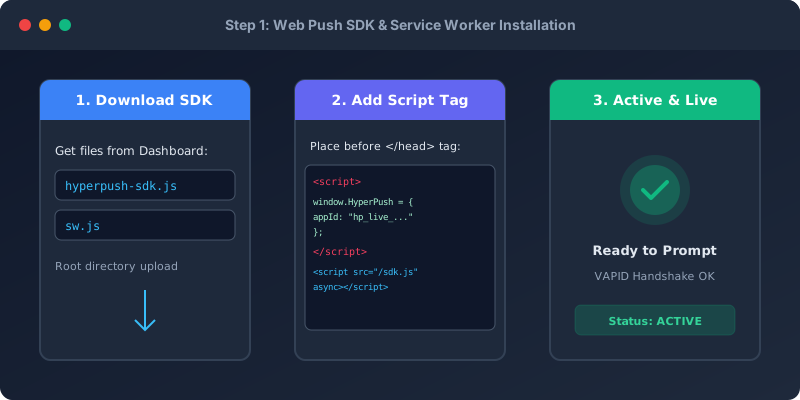
Next, download your pre-configured SDK files from your dashboard:
•••) next to your domain.
sdk.js — Client JavaScript library for your pages.sw.js — Service Worker file that handles background notifications.[!IMPORTANT] Important Placement Rule:
Uploadsw.jsto the root folder of your website (e.g.,https://yourdomain.com/sw.js). This allows HyperPush X to show notifications across every page on your site.
Paste this small code snippet into the <head> or before </body> on your site:
<!-- HyperPush X Web Push -->
<script>
  window.HyperPush = window.HyperPush || [];
  window.HyperPush.push(['init', {
    siteKey: 'YOUR_SITE_KEY_HERE',
    serviceWorkerPath: '/sw.js',
    autoPrompt: true,
    bellWidget: true
  }]);
</script>
<script src="/sdk.js" async></script>
If you use React or Next.js, add the setup inside a component lifecycle hook:
import { useEffect } from 'react';

export default function WebPushSetup() {
  useEffect(() => {
    window.HyperPush = window.HyperPush || [];
    window.HyperPush.push(['init', {
      siteKey: 'YOUR_SITE_KEY_HERE',
      serviceWorkerPath: '/sw.js',
      autoPrompt: true
    }]);

    const script = document.createElement('script');
    script.src = '/sdk.js';
    script.async = true;
    document.head.appendChild(script);
  }, []);

  return null;
}
If you use Vue 3 or Nuxt, add the setup inside onMounted:
<script setup>
import { onMounted } from 'vue';

onMounted(() => {
  window.HyperPush = window.HyperPush || [];
  window.HyperPush.push(['init', {
    siteKey: 'YOUR_SITE_KEY_HERE',
    serviceWorkerPath: '/sw.js',
    autoPrompt: true
  }]);

  const script = document.createElement('script');
  script.src = '/sdk.js';
  script.async = true;
  document.head.appendChild(script);
});
</script>
HyperPush X includes beautiful, high-converting subscription prompts and a floating notification bell widget:

You can easily customize prompt colors, headings, button text, and bell icons right inside your HyperPush X console:

[!TIP] Pro Tip: Triggering subscription prompts after a user interacts with your page leads to much higher subscription rates compared to prompting immediately on landing.
Personalize notifications by attaching custom tags (like user interest, plan, or location) to your subscribers:
window.HyperPush.push(['tag', {
  category: 'sports',
  user_type: 'premium'
}]);
window.HyperPush.push(['setExternalUserId', 'user_12345']);
/subscribers).
[!TIP] Why is the prompt not appearing?
Check if your site is loaded overhttps://. Also ensure you uploadedsw.jsto your root directory.
[!NOTE] What if a user accidentally blocked notifications?
Browsers do not allow websites to automatically re-prompt blocked users. The visitor can re-enable notifications anytime by clicking the lock icon next to the URL in their browser address bar.
 Notification Inbox
3
Notification Inbox
3